Fragment Search
This step consists in identifying the position of NP-fragments on the tested molecules (NPs and synthetic compounds) by using the molecule atom indices:
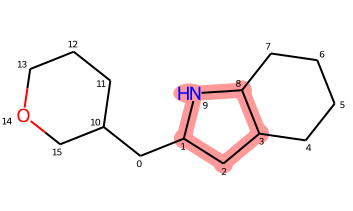
The same pool of fragments has to be applied to both datasets for consistency.
This step is mostly a wrapper around RDKit functionalities to work directly on a DataFrame with the necessary columns for post-processing.
The resulting DataFrame contains a row per Fragment Hit (i.e. fragment occurrence):
idm: the id of the molecule (rowid from df_mols)
idf: the id of the fragment (rowid from df_frags)
_aidxf: the atom indices of the fragment found in the molecule
_fcp_labels: the fragment combination labels
mol_perc: the percentage of the molecule the fragment represents (based on hac)
mol: the molecule as RDKit Mol object
mol_frag: the fragment as RDKit Mol object
Note
While storing the molecules and fragments as RDKit objects in separate rows might appear sub-optimal regarding memory usage, the RDKIt objects are actually not copies but rather references (identical object that have the same memory address). This means that any modification applied to either molecules or fragments will impact all other corresponding references in the DataFrame.
Usage
>>> # load previously standardized molecules and fragments
>>> df_mols = load.file('mols_std.csv.gz')
>>> df_frags = load.file('frags_std.csv.gz')
>>>
>>> # row indices are used to track what fragment is found in what molecule
>>> df_mols.index = list(df_mols['idm'])
>>> df_frags.index = list(df_frags['idm'])
>>>
>>> # run the fragment search
>>> df_fhits = fragment_search.get_fragment_hits(df_mols, df_frags)