draw
Module draw
This modules contains methods for drawing images of molecules with highlighted fragments. A special care was given to blending colors for overlapping fragments.
- class npfc.draw.ColorMap(mol, d_aidxs, palette=None, color_shades=0.0, infer_colors=True)[source]
A class containing all the required information for highlighting a Molecule. It is represented by the count of fragments, atom- and bond colors.
- Parameters
mol (
Mol) – the molecule to highlight. Atom/Bond properties ‘_color’ and ‘num_colors’ are modified in place.d_aidxs (
dict) – a dictionary containing fragment ids as keys and molecule atom indices as values, i.e. {‘frag1’: [(0, 1, 2)]. ‘frag2’: [(2, 3, 4), (5, 6, 7)]}palette (
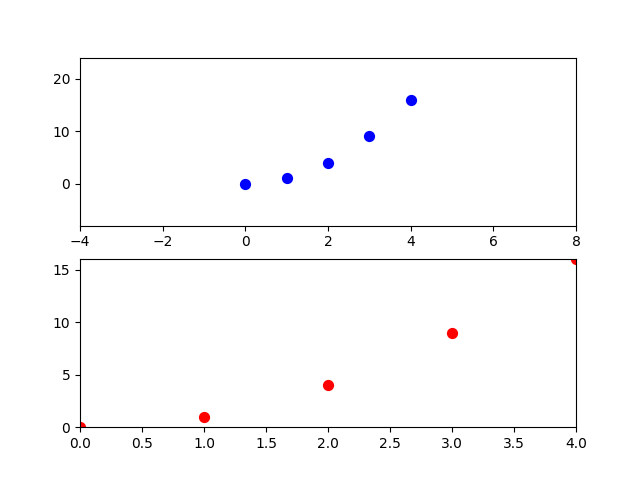
Optional[str]) – a seaborn palette defined by a string. A list of possible palette names can be found at: http://www.python-simple.com/img/img45.png. If none is provided, an intern palette is used instead.color_shades (
float) – use a darker color shade each time a fragment is repeated in the molecule. By default the same color shade is applied each time. On the opposite, a value of 0.05 means 5% darker)infer_colors (
bool) – use the matplotlib/seaborn parsing to determine colors.
- class npfc.draw.DepictionValidator(mol)[source]
Toolkit for estimation of depiction quality.
This is not my code, it was copied from: https://gitlab.ebi.ac.uk/pdbe/ccdutils/blob/master/pdbeccdutils/core/depictions.py
I did this because everytime I try to create an environment using the pdbeccdutils library, I have issues and I have to try to use an older version. So I just extracted the little piece that is required for my project, so I don’t have problems anymore.
- count_bond_collisions()[source]
Counts number of collisions among all bonds. Can be used for estimations of how ‘wrong’ the depiction is.
- Returns:
int: number of bond collisions per molecule
- count_suboptimal_atom_positions(lowerBound, upperBound)[source]
Detects whether the structure has a pair or atoms in the range <lowerBound, upperBound> meaning that the depiction could be improved.
- Arguments:
lowerBound (float): lower bound upperBound (float): upper bound
- Returns:
bool: indication whether or not the atoms are not in optimal coordinates
- depiction_score()[source]
Calculate quality of the ligand depiction. The higher the worse. Ideally that should be 0.
- Returns:
float: Penalty score.
- has_bond_crossing()[source]
Tells if the structure contains collisions
- Returns:
bool: Indication about bond collisions
- has_degenerated_atom_positions(threshold)[source]
Detects whether the structure has a pair or atoms closer to each other than threshold. This can detect structures which may need a template as they can be handled by RDKit correctly.
- Arguments:
threshold (float): Bottom line to use for spatial search.
- Returns:
(bool): if such atomic pair is found
- class npfc.draw.FragmentHighlight(mol, atoms_to_highlight, fragments_colors=None, palette=None, color_gradient=0.2)[source]
A class containing all the required information for highlighting a molecule’s fragments. It is represented by the count of fragments, atom- and bond colors. Destined to replace the ColorMap class.
- Parameters
mol (
Mol) – the molecule to highlight.atoms_to_highlight (
dict) – a dictionary containing fragment ids as keys and molecule atom indices as values, i.e. {‘frag1’: [(0, 1, 2)]. ‘frag2’: [(2, 3, 4), (5, 6, 7)]}. If None and fragmens_colors are defined, then all atoms are highlighted (useful for coloring fragments).fragments_colors (
Optional[dict]) – a dictionary attributing a color to each fragment id. Fragment ids have to match those defined in atoms_to_highlight. If a fragment id is missing, then it will not be highlighted. If this argument is not set, the palette will be used to attribute colors to all fragments defined in atoms_to_highlight.palette (
Optional[Palette]) – a Palette object used to attribute colors to fragments, when fragments_colors are not defined. If none is defined, the default palette will be used.color_gradient (
float) – recycle colors with a darker shade when all colors have been already used. Color gradient should vary between 0 (stays the same) and 1 (fully black).
- npfc.draw.compress_parallel_edges(G)[source]
This is an extremely unoptimized function for preprocessing FCG (networkx MultiGraphs) so they can be drawn more nicely without parallel edges.
- npfc.draw.depict_mol(mol, methods=['CoordGen', 'rdDepictor'], consider_input=True)[source]
Returns the “best” 2D depiction of a molecule according the methods in METHODS_2D. Currently two methods are available:
CoordGen
rdDepictor
A perfect score of 0 means the depiction is good enough (no overalapping atom/bonds) and it is not worth computing other depictions. When no perfect score is reached, the depiction with lowest score is retrieved. In case of tie, the first method applied is preferred. In case the input molecule contains input coordinates, they can be compared to the methods as ‘Input’ (lowest priority).
The method used for depicting the molecule is stored as molecule property: “_2D”. For CoordGen, 2D representations are automatically rescaled with a factor of 1.4. For some molecules, none of the methods yield a “perfect score”. The depiction with the lowest score is thus selected.
- Parameters
- Return type
Mol- Returns
the molecule with 2D coordinates and a new “_2D” property with the information of which depictor was selected.
- npfc.draw.fcg(G, colormap=None, WD_img=None, output_file=None, size=(400, 400), title='__graph__')[source]
A function to represent Fragment Combination Graphs.
Currently, this function has limitations for showing fragments into the nodes:
Individual fragment images have to be generated beforehand and saved into the WD_img directory
Fragment images must be in PNG format
Fragment image files have to comply the naming scheme: “fragment_id.png”
Fragment image backgrounds must be transparent (otherwise the node color will not be visible)
I am currently looking for a nicer and more portable solution, but I admit I am a bit stuck. To compute individual round PNG images of the fragments (and match criteria 1-3), one can use the code below:
>>> # create a directory with individual fragment images (round, png)
>>> mols_draw input_file output_dir
Currently the generated PNG images are not transparent, so they have to be edited with ImageMagick:
>>> # make all PNG files in output dir transparent (from bash)
>>> cd output_dir
>>> for f in *png; do echo $f; convert $f -transparent white $f; done
- Parameters
G – a Graph (NetworkX), generated with the fragment_combination_graph module
colormap – a matching ColorMap object, generated alongside the graph. If none is provided, the nodes will colored in white.
WD_img (
Optional[str]) – a working directory where suitable (see above) frament images are located. If none is provided, fragments will not be displayed in the graph nodes.size (
tuple) – the size of the canvas for the drawingtitle (
str) – add the specified title below the graph, by default molecule_id:fcg_id, or nothing if None
- Returns
a drawing of the fragment combination graph
- npfc.draw.get_d_aidxs_for_rings(mol, fuse_rings=False)[source]
Return a dictionary of atom indices (d_aidxs) for highlighting rings in molecules.
This is purely a helper function to instanciate a ColorMap object, which can highlight SSSR or ring systems instead of fragments.
- Parameters
mol (
Mol) – the input moleculefuse_rings (
bool) – if False: highlight SSSR, if True: highlight fused ring systems
- Return type
- Returns
a dictionary of syntax: {“R#0”: [(0, 1, 2, 3, 4)], “R#1”: [(5, 6, 7, 8, 9)]}. It is a list of tuple for compatibility reasons with fragment highlighting. It could also be edited to highlight rings of a certain size, etc.
- npfc.draw.graph(G, colormap_nodes=None, output_file=None, fig_size=(8, 8), edge_attributes=['fcc'], attribute_names=False, orientate=False, label_node_names_on_edges=False)[source]
Return a matplotlib Figure of a networkx graph.
- Parameters
G (
Graph) – a networkx Graph object of the fragment combinationscolormap_nodes (
Optional[List[Tuple[float]]]) – a colormap of RGB values for the nodes (i.e. [(0, 0, 1), (0, 1, 0)]) or a ColorMap objectoutput_file (
Optional[str]) – if speficied, the image is saved (format is deduced from extension)edge_attributes (
List[str]) – a list of edge attributes to represent on the figureattribute_names (
bool) – display the attribute names on the figure (name: value)
- Return type
Figure- Returns
a matplotlib Figure object
- npfc.draw.highlight_fragment(mol, fragment_id, palette)[source]
This function is to generate an image of a fragment with a given color. The whole fragment will be highlighted. It can be useful for more complex reports to show the colored fragments below a molecule with a colormap.
- Parameters
mol – a molecule to highlight
fragment_id –
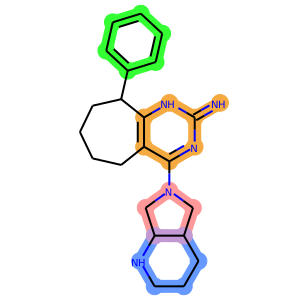
- npfc.draw.mol(mol, colormap=None, output_file=None, img_size=(400, 400), atom_labels=None, svg=True, legend='')[source]
Draw an Image of a molecule with highlighted atoms and bonds according to a colormap. If no Colormap object is provided, no highlighting is done.
This code is based on the 2020.03 RDKit release and the picture below is not yet updated.
- Parameters
mol (
Mol) – the molecule to highlightcolormap (
Optional[ColorMap]) – the colormap to use for highlighting the moleculeexeclude_exocyclic_from_highlight – since exocyclic atoms are not used for fc classification, this option allows the user to mask exocyclic atoms from highlights
output_file (
Optional[str]) – if speficied, the image is saved (format is deduced from extension)atom_labels (
Union[str,dict,None]) – display atom labels. Parameter can either value ‘atom_indices’ or a dictionary with atom_index: label (i.e. fcp).svg (
bool) – use SVG format instead of PNG
- Return type
Image- Returns
an Image of the highlighted molecule
- npfc.draw.mols(mols, colormaps=[], output_file=None, sub_img_size=(300, 300), max_mols_per_row=5, debug=False, svg=True, legends=None)[source]
Draw an Image of a list of molecules with highlighted atoms and bonds according to a list of colormaps.
..warning:: This function is based on the old RDKit drawing code (< 2020.03) and thus it is necessary to blend colors (i.e. colormap.blend()) first to represent common atoms/bonds between fragments.
- Parameters
mols (
List[Mol]) – the molecules to highlightcolormaps (
List[ColorMap]) – the colormaps to use for highlighting the moleculesoutput_file (
Optional[str]) – if speficied, the image is saved (format is deduced from extension)sub_img_size (
Tuple[int]) – the size of the image of every molecule composing the gridmax_mols_per_row (
int) – the maximum number of molecules displayed per rowdebug (
bool) – display atom indices on the structuresvg (
bool) – use SVG format instead of PNG
- Returns
an Image of the highlighted molecules
- npfc.draw.reaction(mol1, mol2, sub_img_size=(200, 200), svg=True, output_file=None)[source]
Wrapper function around RDKit ReactionToImage function. If the molecules are Mol objects, they are converted to Smiles. If not, they are assumed to be already Smiles.
Warning
There is currently no way of not displaying aromatic rings instead of kekulized rings. The original SMILES for the reaction can be displayed using a DEBUG logging level.